
Windows 2008 R2 Language Bar keeps changing Keyboard Settings
Is the Windows Server 2008 an R2 language bar driving you crazy when using RDP or ICA?
Everytime you login the keyboard setting will be changed into you’re Local setting in my case Dutch, this is very innoying.
The reason for this is Microsoft put in a nice new Feature in 2008 called Auto detect Remote Keyboard layout and this will change you’re layout in the RDP session.
The solution is quit simple change these registry settings through a policy or login script:
Disable Auto Detect Keyboard Layout:
[HKEY_LOCAL_MACHINE\SYSTEM\CurrentControlSet\Control\Keyboard Layout]
“IgnoreRemoteKeyboardLayout”=dword:00000001
Hide Language Bar:
[HKEY_CURRENT_USER\Software\Microsoft\CTF\LangBar]
“ShowStatus”=dword:00000003
This can be used on Server, Terminal Server and Citrix Server.
Example add registry setting through Group Policy
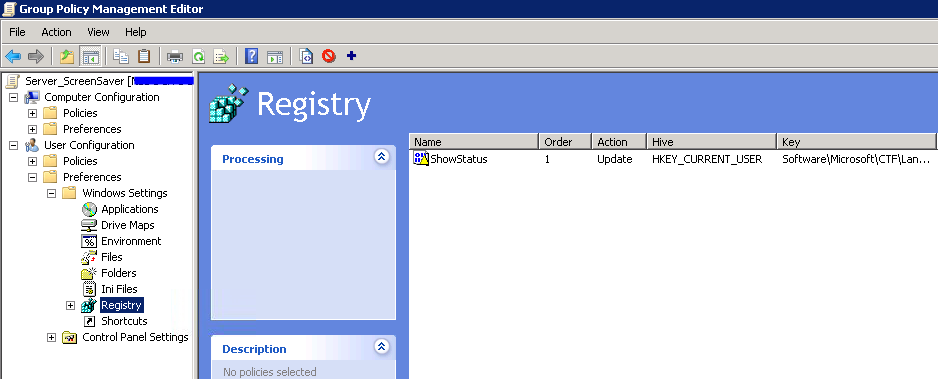
Thanks to @JvPeer for the Intel
Thanks for the fix!
Despite the fact that we HAVE this registry setting on all of our Citrix servers, randmly our keyboard switches and users have to revert it using CTRL – left Shift.
Could it be an application changing the keyboard settings?
Thanks in advance,
Jack
Hi Jack,
I don’t haven’t experienced this, this always did the trick for me.
Sorry I couldn’t help you.
Regards,
Michael
This post led me to the right area but the folders were different on my Group Policy Editor. What I did was to open the Administrative Templates, Control Panel, Regional & Language Options and then select “Restrict the UI language…”
By restricting the language to English I was no longer getting the foreign keyboard when I logged on remotely.
One small omission from the article. Is this supposed to be implemented on the remote or local machine?
Hi Martin, this setting needs to be set on the Receiving/remote side.
Thank you so much for the resolution.It worked well.
Reporting from 2017. This saved my sanity. Thank you
2023 and this saved my fuking day windows 11