
How to cleanup the winsxs folder on Windows 7 (SP1)/ Windows 2008 / Windows 2008 R2 (SP1)
The winsxs folder in c:\windows can be really big, the only way to cleanup is using the microsoft command line tools :
Windows Server 2003 : VSP1CLEAN.exe
Windows Server 2008 : COMPCLN.exe
Windows 7 and Server 2008 R2 : DISM.exe
I will explain the last one here. Start your command prompt As Administrator.
Usage: dism /online /cleanup-image /spsuperseded
Note:
After running this command it won’t be possible to uninstall any service packs!
Before :
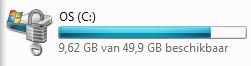
After:
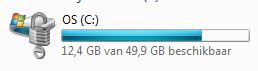
So almost 3Gb on my Windows 7 Sp1 machine is released.
You can also run these commands :
Takeown /f %windir%\winsxs\ManifestCache\*
Icacls %windir%\winsxs\ManifestCache\* /GRANT administrators:F
Del /q %windir%\winsxs\ManifestCache\*
In my case this cleanup another 500Mb
it is very good actually is excellent since it is simple and straight forward ….
appreciate your help
Thanks a lot for this! Gave me another 3+ GB of free space which I desperately needed 🙂
Dank U wel. I have never seen the Del /q command used before to help clean winsxs. Saved me a very needed GB.
Graag gedaan 😉
Here is link to a Microsoft support article as well for the same issue
http://support.microsoft.com/kb/2592038
Took 30 minutes to complete the execution , it is very good cleanup gave me 3+ GB in C Drive extra space.
I went from 13Gb to 5Gb!!!!!
THANKS 😀 😀 😀
I got 3 GB free space by this method
Hi,This is not working and i got the error:87
Anyone can help me to solve the issue.
Hi Tamizhmaran.v,
Are you using Windows 7 SP1? If not loose the /spsuperseded option : dism /online /cleanup-image
and are you running the CMD “As Administrator”!
hi, I have the same problem, and yes, I run it as administrator, please some help
SP1 is actually installed?
Or try without the /spsuperseded parameter
Regards,
Michael
Na enkele minuutjes kreeg ik :
“Error 87
The spsuperseded option is not recognized in this context.”
Enig idee?
Bedankt voor uw hulp.
Hoi Kris,
Je kunt hem ook gebruiken zonder die optie, waarschijnlijk is SP1 niet geïnstalleerd?
for all who got error 87 , you should update first to SP1 then run the command
3G Free .. 😀
thanks
hi,
What you mean by that “I will not able to uninstall service pack”? I mean what type of problems making service pack permanent will give to me in future?
Thanks
Hi Ankit,
In general this won’t give any problems. I mentioned it to make sure everybody knows the potentional risks.
Hallo Michael,
Ik krijg de volgende fout:
“De opruiming van het servicepack kan niet doorgaan: er zijn geen back-upbestanden voor het sevicepack gevonden.”
Hoe maak ik die back-up? Is dat überhaupt nodig? Kan ik iets anders doen?
Dank, Dick
Hoi,
Ik ken die specifieke melding niet, maar het lijkt me dat er geen bestanden geschikt zijn om opgeruimd te worden. Je kunt geen specifieke backup maken.
hi Micheal i have win 7 with service pack 1 and when i run command i get Error 5 access denied ??
Any help
Tried it in an Elevated Windows (Run as Administrator) ?
Cleaned 900MB :S I’d expect more but it isn’t every day x-mas is it…
The good thing is I always save 8GB for Windows Backup, so i can safely delete it and create a new one instead.
Deleting Hibernation file also gave me a 4-5GB bonus space (It can be re-enabled anytime so, why not 🙂
From 13,295MB to 8791MB for me. My install of Win 7 SP1 is only 90 days old…
Free space: 3,6 GB
with: dism /online /cleanup-image /spsuperseded
hey michael after typing the command in cmd i get the following reply
Error: 740
Elevated permissions are required to run DISM.
Use an elevated command prompt to complete these tasks.
Hi Ivan,
This is a normal message, you should run the command in an Elevated Command Windows eg. Rightclick on the Command prompt icon and select Run as Administrator and use the command in that window.
Regards,
Michael
Olá!
Escrevi essa dica em português com o passo-a-passo explicando como reduzir o tamanho da pasta Winsxs.
Segue o link: http://www.brunocunha.com/blog/tecnologia/reduzir-tamanho-pasta-winsxs/
Espero que ajude aos seus visitantes que falam Português.
Abs.
Hi team,
Need some help here. How do i apply this code for remove the windir\winsxs\Mainifestcache in powershell scripts?
Hi Dino,
Unfortunately there is no Powershell equivalent of these commands.
Michael
Good post regarding WinSXS cleanup in Windows7 & 2008. A few thoughts regarding WinSXS cleanup in Win8+ and Win12+ http://www.karafilis.net/winsxs-cleanup
I used your tutorial, but result: “dism is not recognized as an internal or external command, operable program or batch file”. Please help me. Thanks
Hi,
DISM is Only on Windows 7 and up.
it works perfect, thank you
Didn’t work for me. I received a log.
Wath can I do ?
2014-03-05 12:22:36, Info DISM PID=5736 Scratch directory set to ‘C:\Users\ADMINI~1\AppData\Local\Temp\3\’. – CDISMManager::put_ScratchDir
2014-03-05 12:22:36, Info DISM PID=5736 Successfully loaded the ImageSession at “C:\Windows\System32\Dism” – CDISMManager::LoadImageSession
2014-03-05 12:22:36, Info DISM DISM Provider Store: PID=5736 Found and Initialized the DISM Logger. – CDISMProviderStore::Internal_InitializeLogger
2014-03-05 12:22:36, Info DISM DISM Provider Store: PID=5736 Failed to get and initialize the PE Provider. Continuing by assuming that it is not a WinPE image. – CDISMProviderStore::Final_OnConnect
2014-03-05 12:22:36, Info DISM DISM Provider Store: PID=5736 Finished initializing the Provider Map. – CDISMProviderStore::Final_OnConnect
2014-03-05 12:22:36, Info DISM DISM Provider Store: PID=5736 Getting Provider DISMLogger – CDISMProviderStore::GetProvider
2014-03-05 12:22:36, Info DISM DISM Provider Store: PID=5736 Provider has previously been initialized. Returning the existing instance. – CDISMProviderStore::Internal_GetProvider
2014-03-05 12:22:36, Info DISM DISM Provider Store: PID=5736 Getting Provider DISMLogger – CDISMProviderStore::GetProvider
2014-03-05 12:22:36, Info DISM DISM Provider Store: PID=5736 Provider has previously been initialized. Returning the existing instance. – CDISMProviderStore::Internal_GetProvider
2014-03-05 12:22:36, Info DISM DISM Manager: PID=5736 Successfully created the local image session and provider store. – CDISMManager::CreateLocalImageSession
2014-03-05 12:22:36, Info DISM DISM Provider Store: PID=5736 Getting Provider DISMLogger – CDISMProviderStore::GetProvider
2014-03-05 12:22:36, Info DISM DISM Provider Store: PID=5736 Provider has previously been initialized. Returning the existing instance. – CDISMProviderStore::Internal_GetProvider
2014-03-05 12:22:36, Info DISM DISM.EXE:
2014-03-05 12:22:36, Info DISM DISM.EXE:
2014-03-05 12:22:36, Info DISM DISM.EXE:
2014-03-05 12:22:36, Info DISM DISM.EXE: Host machine information: OS Version=6.1.7600, Running architecture=amd64, Number of processors=4
2014-03-05 12:22:36, Info DISM DISM.EXE: Executing command line: dism /online /cleanup-image /spsuperseded
2014-03-05 12:22:36, Info DISM DISM Provider Store: PID=5736 Getting Provider FolderManager – CDISMProviderStore::GetProvider
2014-03-05 12:22:36, Info DISM DISM Provider Store: PID=5736 Provider has not previously been encountered. Attempting to initialize the provider. – CDISMProviderStore::Internal_GetProvider
2014-03-05 12:22:36, Info DISM DISM Provider Store: PID=5736 Loading Provider from location C:\Windows\System32\Dism\FolderProvider.dll – CDISMProviderStore::Internal_GetProvider
2014-03-05 12:22:36, Info DISM DISM Provider Store: PID=5736 Connecting to the provider located at C:\Windows\System32\Dism\FolderProvider.dll. – CDISMProviderStore::Internal_LoadProvider
2014-03-05 12:22:36, Info DISM DISM Provider Store: PID=5736 Getting Provider FolderManager – CDISMProviderStore::GetProvider
2014-03-05 12:22:36, Info DISM DISM Provider Store: PID=5736 Provider has previously been initialized. Returning the existing instance. – CDISMProviderStore::Internal_GetProvider
2014-03-05 12:22:37, Info DISM DISM Manager: PID=5736 Successfully loaded the ImageSession at “C:\Users\ADMINI~1\AppData\Local\Temp\3\1178E55F-6224-41E0-91E1-015F6E59FD49″ – CDISMManager::LoadImageSession
2014-03-05 12:22:37, Info DISM DISM Image Session: PID=816 Instantiating the Provider Store. – CDISMImageSession::get_ProviderStore
2014-03-05 12:22:37, Info DISM DISM Provider Store: PID=816 Initializing a provider store for the IMAGE session type. – CDISMProviderStore::Final_OnConnect
2014-03-05 12:22:37, Info DISM DISM Provider Store: PID=816 Provider has not previously been encountered. Attempting to initialize the provider. – CDISMProviderStore::Internal_GetProvider
2014-03-05 12:22:37, Info DISM DISM Provider Store: PID=816 Loading Provider from location C:\Users\ADMINI~1\AppData\Local\Temp\3\1178E55F-6224-41E0-91E1-015F6E59FD49\OSProvider.dll – CDISMProviderStore::Internal_GetProvider
2014-03-05 12:22:37, Info DISM DISM Provider Store: PID=816 Connecting to the provider located at C:\Users\ADMINI~1\AppData\Local\Temp\3\1178E55F-6224-41E0-91E1-015F6E59FD49\OSProvider.dll. – CDISMProviderStore::Internal_LoadProvider
2014-03-05 12:22:37, Info DISM DISM OS Provider: PID=816 Defaulting SystemPath to C:\ – CDISMOSServiceManager::Final_OnConnect
2014-03-05 12:22:37, Info DISM DISM OS Provider: PID=816 Defaulting Windows folder to C:\Windows – CDISMOSServiceManager::Final_OnConnect
2014-03-05 12:22:37, Info DISM DISM Provider Store: PID=816 Attempting to initialize the logger from the Image Session. – CDISMProviderStore::Final_OnConnect
2014-03-05 12:22:37, Info DISM DISM Provider Store: PID=816 Provider has not previously been encountered. Attempting to initialize the provider. – CDISMProviderStore::Internal_GetProvider
2014-03-05 12:22:37, Info DISM DISM Provider Store: PID=816 Loading Provider from location C:\Users\ADMINI~1\AppData\Local\Temp\3\1178E55F-6224-41E0-91E1-015F6E59FD49\LogProvider.dll – CDISMProviderStore::Internal_GetProvider
2014-03-05 12:22:37, Info DISM DISM Provider Store: PID=816 Connecting to the provider located at C:\Users\ADMINI~1\AppData\Local\Temp\3\1178E55F-6224-41E0-91E1-015F6E59FD49\LogProvider.dll. – CDISMProviderStore::Internal_LoadProvider
2014-03-05 12:22:37, Info DISM DISM Provider Store: PID=816 Getting Provider OSServices – CDISMProviderStore::GetProvider
2014-03-05 12:22:37, Info DISM DISM Provider Store: PID=816 Provider has previously been initialized. Returning the existing instance. – CDISMProviderStore::Internal_GetProvider
2014-03-05 12:22:37, Info DISM DISM Provider Store: PID=816 Found and Initialized the DISM Logger. – CDISMProviderStore::Internal_InitializeLogger
2014-03-05 12:22:37, Info DISM DISM Provider Store: PID=816 Provider has not previously been encountered. Attempting to initialize the provider. – CDISMProviderStore::Internal_GetProvider
2014-03-05 12:22:37, Info DISM DISM Provider Store: PID=816 Loading Provider from location C:\Users\ADMINI~1\AppData\Local\Temp\3\1178E55F-6224-41E0-91E1-015F6E59FD49\PEProvider.dll – CDISMProviderStore::Internal_GetProvider
2014-03-05 12:22:37, Warning DISM DISM Provider Store: PID=816 Failed to Load the provider: C:\Users\ADMINI~1\AppData\Local\Temp\3\1178E55F-6224-41E0-91E1-015F6E59FD49\PEProvider.dll. – CDISMProviderStore::Internal_GetProvider(hr:0x8007007e)
2014-03-05 12:22:37, Info DISM DISM Provider Store: PID=816 Failed to get and initialize the PE Provider. Continuing by assuming that it is not a WinPE image. – CDISMProviderStore::Final_OnConnect
2014-03-05 12:22:37, Info DISM DISM Provider Store: PID=816 Finished initializing the Provider Map. – CDISMProviderStore::Final_OnConnect
2014-03-05 12:22:37, Info DISM DISM Provider Store: PID=816 Getting Provider DISMLogger – CDISMProviderStore::GetProvider
2014-03-05 12:22:37, Info DISM DISM Provider Store: PID=816 Provider has previously been initialized. Returning the existing instance. – CDISMProviderStore::Internal_GetProvider
2014-03-05 12:22:37, Info DISM DISM Manager: PID=5736 Image session successfully loaded from the temporary location: C:\Users\ADMINI~1\AppData\Local\Temp\3\1178E55F-6224-41E0-91E1-015F6E59FD49 – CDISMManager::CreateImageSession
2014-03-05 12:22:37, Info DISM DISM Provider Store: PID=816 Getting Provider OSServices – CDISMProviderStore::GetProvider
2014-03-05 12:22:37, Info DISM DISM Provider Store: PID=816 Provider has previously been initialized. Returning the existing instance. – CDISMProviderStore::Internal_GetProvider
2014-03-05 12:22:37, Info CSI 00000001 Shim considered [l:256{128}]”\??\C:\Windows\Servicing\amd64_microsoft-windows-servicingstack_31bf3856ad364e35_6.1.7601.17592_none_672ce6c3de2cb17f\pkgmgr.exe” : got STATUS_OBJECT_PATH_NOT_FOUND
2014-03-05 12:22:37, Info CSI 00000002 Shim considered [l:250{125}]”\??\C:\Windows\WinSxS\amd64_microsoft-windows-servicingstack_31bf3856ad364e35_6.1.7601.17592_none_672ce6c3de2cb17f\pkgmgr.exe” : got STATUS_SUCCESS
2014-03-05 12:22:37, Info DISM DISM.EXE: Target image information: OS Version=6.1.7601.17592, Image architecture=amd64
2014-03-05 12:22:37, Info DISM DISM Provider Store: PID=816 Getting the collection of providers from an image provider store type. – CDISMProviderStore::GetProviderCollection
2014-03-05 12:22:37, Info DISM DISM Provider Store: PID=816 Provider has not previously been encountered. Attempting to initialize the provider. – CDISMProviderStore::Internal_GetProvider
2014-03-05 12:22:37, Info DISM DISM Provider Store: PID=816 Loading Provider from location C:\Users\ADMINI~1\AppData\Local\Temp\3\1178E55F-6224-41E0-91E1-015F6E59FD49\CbsProvider.dll – CDISMProviderStore::Internal_GetProvider
2014-03-05 12:22:37, Info DISM DISM Provider Store: PID=816 Connecting to the provider located at C:\Users\ADMINI~1\AppData\Local\Temp\3\1178E55F-6224-41E0-91E1-015F6E59FD49\CbsProvider.dll. – CDISMProviderStore::Internal_LoadProvider
2014-03-05 12:22:37, Info DISM DISM Provider Store: PID=816 Encountered a servicing provider, performing additional servicing initializations. – CDISMProviderStore::Internal_LoadProvider
2014-03-05 12:22:37, Info CSI 00000001 Shim considered [l:256{128}]”\??\C:\Windows\Servicing\amd64_microsoft-windows-servicingstack_31bf3856ad364e35_6.1.7601.17592_none_672ce6c3de2cb17f\pkgmgr.exe” : got STATUS_OBJECT_PATH_NOT_FOUND
2014-03-05 12:22:37, Info CSI 00000002 Shim considered [l:250{125}]”\??\C:\Windows\WinSxS\amd64_microsoft-windows-servicingstack_31bf3856ad364e35_6.1.7601.17592_none_672ce6c3de2cb17f\pkgmgr.exe” : got STATUS_SUCCESS
2014-03-05 12:22:37, Info DISM DISM Package Manager: PID=816 Finished initializing the CbsConUI Handler. – CCbsConUIHandler::Initialize
2014-03-05 12:22:37, Info CSI 00000001 Shim considered [l:256{128}]”\??\C:\Windows\Servicing\amd64_microsoft-windows-servicingstack_31bf3856ad364e35_6.1.7601.17592_none_672ce6c3de2cb17f\pkgmgr.exe” : got STATUS_OBJECT_PATH_NOT_FOUND
2014-03-05 12:22:37, Info CSI 00000002 Shim considered [l:250{125}]”\??\C:\Windows\WinSxS\amd64_microsoft-windows-servicingstack_31bf3856ad364e35_6.1.7601.17592_none_672ce6c3de2cb17f\pkgmgr.exe” : got STATUS_SUCCESS
2014-03-05 12:22:37, Info DISM DISM Package Manager: PID=816 CBS is being initialized for online use. More information about CBS actions can be located at: %windir%\logs\cbs\cbs.log – CDISMPackageManager::Initialize
2014-03-05 12:22:39, Info DISM DISM Package Manager: PID=816 Loaded servicing stack for online use only. – CDISMPackageManager::RefreshInstanceAndLock
2014-03-05 12:22:39, Info DISM DISM Provider Store: PID=816 Provider has not previously been encountered. Attempting to initialize the provider. – CDISMProviderStore::Internal_GetProvider
2014-03-05 12:22:39, Info DISM DISM Provider Store: PID=816 Loading Provider from location C:\Users\ADMINI~1\AppData\Local\Temp\3\1178E55F-6224-41E0-91E1-015F6E59FD49\MsiProvider.dll – CDISMProviderStore::Internal_GetProvider
2014-03-05 12:22:39, Info DISM DISM Provider Store: PID=816 Connecting to the provider located at C:\Users\ADMINI~1\AppData\Local\Temp\3\1178E55F-6224-41E0-91E1-015F6E59FD49\MsiProvider.dll. – CDISMProviderStore::Internal_LoadProvider
2014-03-05 12:22:39, Info DISM DISM Provider Store: PID=816 Encountered a servicing provider, performing additional servicing initializations. – CDISMProviderStore::Internal_LoadProvider
2014-03-05 12:22:39, Info DISM DISM Provider Store: PID=816 Provider has not previously been encountered. Attempting to initialize the provider. – CDISMProviderStore::Internal_GetProvider
2014-03-05 12:22:39, Info DISM DISM Provider Store: PID=816 Loading Provider from location C:\Users\ADMINI~1\AppData\Local\Temp\3\1178E55F-6224-41E0-91E1-015F6E59FD49\IntlProvider.dll – CDISMProviderStore::Internal_GetProvider
2014-03-05 12:22:39, Info DISM DISM Provider Store: PID=816 Connecting to the provider located at C:\Users\ADMINI~1\AppData\Local\Temp\3\1178E55F-6224-41E0-91E1-015F6E59FD49\IntlProvider.dll. – CDISMProviderStore::Internal_LoadProvider
2014-03-05 12:22:39, Info DISM DISM Provider Store: PID=816 Encountered a servicing provider, performing additional servicing initializations. – CDISMProviderStore::Internal_LoadProvider
2014-03-05 12:22:39, Info DISM DISM Provider Store: PID=816 Provider has not previously been encountered. Attempting to initialize the provider. – CDISMProviderStore::Internal_GetProvider
2014-03-05 12:22:39, Info DISM DISM Provider Store: PID=816 Loading Provider from location C:\Users\ADMINI~1\AppData\Local\Temp\3\1178E55F-6224-41E0-91E1-015F6E59FD49\DmiProvider.dll – CDISMProviderStore::Internal_GetProvider
2014-03-05 12:22:39, Info DISM DISM Provider Store: PID=816 Connecting to the provider located at C:\Users\ADMINI~1\AppData\Local\Temp\3\1178E55F-6224-41E0-91E1-015F6E59FD49\DmiProvider.dll. – CDISMProviderStore::Internal_LoadProvider
2014-03-05 12:22:39, Info DISM DISM Provider Store: PID=816 Encountered a servicing provider, performing additional servicing initializations. – CDISMProviderStore::Internal_LoadProvider
2014-03-05 12:22:39, Info CSI 00000001 Shim considered [l:256{128}]”\??\C:\Windows\Servicing\amd64_microsoft-windows-servicingstack_31bf3856ad364e35_6.1.7601.17592_none_672ce6c3de2cb17f\pkgmgr.exe” : got STATUS_OBJECT_PATH_NOT_FOUND
2014-03-05 12:22:39, Info CSI 00000002 Shim considered [l:250{125}]”\??\C:\Windows\WinSxS\amd64_microsoft-windows-servicingstack_31bf3856ad364e35_6.1.7601.17592_none_672ce6c3de2cb17f\pkgmgr.exe” : got STATUS_SUCCESS
2014-03-05 12:22:39, Info DISM DISM OS Provider: PID=816 Successfully loaded the hive. – CDISMOSServiceManager::DetermineBootDrive
2014-03-05 12:22:39, Info DISM DISM Driver Manager: PID=816 Further logs for driver related operations can be found in the target operating system at %WINDIR%\inf\setupapi.offline.log – CDriverManager::Initialize
2014-03-05 12:22:39, Info DISM DISM Provider Store: PID=816 Provider has not previously been encountered. Attempting to initialize the provider. – CDISMProviderStore::Internal_GetProvider
2014-03-05 12:22:39, Info DISM DISM Provider Store: PID=816 Loading Provider from location C:\Users\ADMINI~1\AppData\Local\Temp\3\1178E55F-6224-41E0-91E1-015F6E59FD49\UnattendProvider.dll – CDISMProviderStore::Internal_GetProvider
2014-03-05 12:22:39, Info DISM DISM Provider Store: PID=816 Connecting to the provider located at C:\Users\ADMINI~1\AppData\Local\Temp\3\1178E55F-6224-41E0-91E1-015F6E59FD49\UnattendProvider.dll. – CDISMProviderStore::Internal_LoadProvider
2014-03-05 12:22:39, Info DISM DISM Provider Store: PID=816 Encountered a servicing provider, performing additional servicing initializations. – CDISMProviderStore::Internal_LoadProvider
2014-03-05 12:22:39, Info DISM DISM Provider Store: PID=816 Provider has not previously been encountered. Attempting to initialize the provider. – CDISMProviderStore::Internal_GetProvider
2014-03-05 12:22:39, Info DISM DISM Provider Store: PID=816 Loading Provider from location C:\Users\ADMINI~1\AppData\Local\Temp\3\1178E55F-6224-41E0-91E1-015F6E59FD49\SmiProvider.dll – CDISMProviderStore::Internal_GetProvider
2014-03-05 12:22:39, Info DISM DISM Provider Store: PID=816 Connecting to the provider located at C:\Users\ADMINI~1\AppData\Local\Temp\3\1178E55F-6224-41E0-91E1-015F6E59FD49\SmiProvider.dll. – CDISMProviderStore::Internal_LoadProvider
2014-03-05 12:22:39, Info DISM DISM Provider Store: PID=816 Encountered a servicing provider, performing additional servicing initializations. – CDISMProviderStore::Internal_LoadProvider
2014-03-05 12:22:39, Info DISM DISM Provider Store: PID=816 Provider has not previously been encountered. Attempting to initialize the provider. – CDISMProviderStore::Internal_GetProvider
2014-03-05 12:22:39, Info DISM DISM Provider Store: PID=816 Loading Provider from location C:\Users\ADMINI~1\AppData\Local\Temp\3\1178E55F-6224-41E0-91E1-015F6E59FD49\TransmogProvider.dll – CDISMProviderStore::Internal_GetProvider
2014-03-05 12:22:39, Info DISM DISM Provider Store: PID=816 Connecting to the provider located at C:\Users\ADMINI~1\AppData\Local\Temp\3\1178E55F-6224-41E0-91E1-015F6E59FD49\TransmogProvider.dll. – CDISMProviderStore::Internal_LoadProvider
2014-03-05 12:22:39, Info DISM DISM Provider Store: PID=816 Encountered a servicing provider, performing additional servicing initializations. – CDISMProviderStore::Internal_LoadProvider
2014-03-05 12:22:39, Info DISM DISM Provider Store: PID=816 Getting Provider DISM Package Manager – CDISMProviderStore::GetProvider
2014-03-05 12:22:39, Info DISM DISM Provider Store: PID=816 Provider has previously been initialized. Returning the existing instance. – CDISMProviderStore::Internal_GetProvider
2014-03-05 12:22:39, Info DISM DISM Provider Store: PID=816 Getting Provider DISM Unattend Manager – CDISMProviderStore::GetProvider
2014-03-05 12:22:39, Info DISM DISM Provider Store: PID=816 Provider has previously been initialized. Returning the existing instance. – CDISMProviderStore::Internal_GetProvider
2014-03-05 12:22:39, Info DISM DISM.EXE: Got the collection of providers. Now enumerating them to build the command table.
2014-03-05 12:22:39, Info DISM DISM.EXE: Attempting to add the commands from provider: DISM Package Manager
2014-03-05 12:22:39, Info DISM DISM.EXE: Succesfully registered commands for the provider: DISM Package Manager.
2014-03-05 12:22:39, Info DISM DISM.EXE: Attempting to add the commands from provider: OSServices
2014-03-05 12:22:39, Info DISM DISM.EXE: Attempting to add the commands from provider: MsiManager
2014-03-05 12:22:39, Info DISM DISM.EXE: Succesfully registered commands for the provider: MsiManager.
2014-03-05 12:22:39, Info DISM DISM.EXE: Attempting to add the commands from provider: IntlManager
2014-03-05 12:22:39, Info DISM DISM.EXE: Succesfully registered commands for the provider: IntlManager.
2014-03-05 12:22:39, Info DISM DISM.EXE: Attempting to add the commands from provider: DriverManager
2014-03-05 12:22:39, Info DISM DISM.EXE: Succesfully registered commands for the provider: DriverManager.
2014-03-05 12:22:39, Info DISM DISM.EXE: Attempting to add the commands from provider: DISM Unattend Manager
2014-03-05 12:22:39, Info DISM DISM.EXE: Succesfully registered commands for the provider: DISM Unattend Manager.
2014-03-05 12:22:39, Info DISM DISM.EXE: Attempting to add the commands from provider: DISM Log Provider
2014-03-05 12:22:39, Info DISM DISM.EXE: Attempting to add the commands from provider: SmiManager
2014-03-05 12:22:39, Info DISM DISM.EXE: Attempting to add the commands from provider: Edition Manager
2014-03-05 12:22:39, Info DISM DISM Transmog Provider: PID=816 Current image session is [ONLINE] – CTransmogManager::GetMode
2014-03-05 12:22:39, Info DISM DISM.EXE: Succesfully registered commands for the provider: Edition Manager.
2014-03-05 12:22:39, Info DISM DISM Provider Store: PID=816 Getting Provider DISM Package Manager – CDISMProviderStore::GetProvider
2014-03-05 12:22:39, Info DISM DISM Provider Store: PID=816 Provider has previously been initialized. Returning the existing instance. – CDISMProviderStore::Internal_GetProvider
2014-03-05 12:22:39, Info DISM DISM Package Manager: PID=816 Processing the top level command token(cleanup-image). – CPackageManagerCLIHandler::Private_ValidateCmdLine
2014-03-05 12:22:39, Info DISM DISM Package Manager: PID=816 The option(spsuperseded) is not recognized in this context. – CPackageManagerCLIHandler::Private_ValidateCmdLine
2014-03-05 12:22:39, Info DISM DISM Package Manager: PID=816 Further logs for online package and feature related operations can be found at %WINDIR%\logs\CBS\cbs.log – CPackageManagerCLIHandler::ExecuteCmdLine
2014-03-05 12:22:39, Info DISM DISM Image Session: PID=816 Disconnecting the provider store – CDISMImageSession::Final_OnDisconnect
2014-03-05 12:22:39, Info DISM DISM Provider Store: PID=816 Finalizing the servicing provider(DISM Package Manager) – CDISMProviderStore::Internal_DisconnectProvider
2014-03-05 12:22:39, Info DISM DISM Package Manager: PID=816 Finalizing CBS core. – CDISMPackageManager::Finalize
2014-03-05 12:22:39, Info DISM DISM Provider Store: PID=816 Disconnecting Provider: DISM Package Manager – CDISMProviderStore::Internal_DisconnectProvider
2014-03-05 12:22:39, Info DISM DISM Provider Store: PID=816 Found the OSServices. Waiting to finalize it until all other providers are unloaded. – CDISMProviderStore::Final_OnDisconnect
2014-03-05 12:22:39, Info DISM DISM Provider Store: PID=816 Finalizing the servicing provider(MsiManager) – CDISMProviderStore::Internal_DisconnectProvider
2014-03-05 12:22:39, Info DISM DISM Provider Store: PID=816 Disconnecting Provider: MsiManager – CDISMProviderStore::Internal_DisconnectProvider
2014-03-05 12:22:39, Info DISM DISM Provider Store: PID=816 Finalizing the servicing provider(IntlManager) – CDISMProviderStore::Internal_DisconnectProvider
2014-03-05 12:22:39, Info DISM DISM Provider Store: PID=816 Disconnecting Provider: IntlManager – CDISMProviderStore::Internal_DisconnectProvider
2014-03-05 12:22:39, Info DISM DISM Provider Store: PID=816 Found the PE Provider. Waiting to finalize it until all other providers are unloaded. – CDISMProviderStore::Final_OnDisconnect
2014-03-05 12:22:39, Info DISM DISM Provider Store: PID=816 Finalizing the servicing provider(DriverManager) – CDISMProviderStore::Internal_DisconnectProvider
2014-03-05 12:22:39, Info DISM DISM Provider Store: PID=816 Disconnecting Provider: DriverManager – CDISMProviderStore::Internal_DisconnectProvider
2014-03-05 12:22:39, Info DISM DISM Provider Store: PID=816 Finalizing the servicing provider(DISM Unattend Manager) – CDISMProviderStore::Internal_DisconnectProvider
2014-03-05 12:22:39, Info DISM DISM Provider Store: PID=816 Disconnecting Provider: DISM Unattend Manager – CDISMProviderStore::Internal_DisconnectProvider
2014-03-05 12:22:39, Info DISM DISM Provider Store: PID=816 Found the OSServices. Waiting to finalize it until all other providers are unloaded. – CDISMProviderStore::Final_OnDisconnect
2014-03-05 12:22:39, Info DISM DISM Provider Store: PID=816 Finalizing the servicing provider(SmiManager) – CDISMProviderStore::Internal_DisconnectProvider
2014-03-05 12:22:39, Info DISM DISM Provider Store: PID=816 Disconnecting Provider: SmiManager – CDISMProviderStore::Internal_DisconnectProvider
2014-03-05 12:22:39, Info DISM DISM Provider Store: PID=816 Finalizing the servicing provider(Edition Manager) – CDISMProviderStore::Internal_DisconnectProvider
2014-03-05 12:22:39, Info DISM DISM Provider Store: PID=816 Disconnecting Provider: Edition Manager – CDISMProviderStore::Internal_DisconnectProvider
2014-03-05 12:22:39, Info DISM DISM Provider Store: PID=816 Releasing the local reference to OSServices. – CDISMProviderStore::Internal_DisconnectProvider
2014-03-05 12:22:39, Info DISM DISM Provider Store: PID=816 Disconnecting Provider: OSServices – CDISMProviderStore::Internal_DisconnectProvider
2014-03-05 12:22:39, Info DISM DISM Provider Store: PID=816 Releasing the local reference to DISMLogger. Stop logging. – CDISMProviderStore::Internal_DisconnectProvider
2014-03-05 12:22:39, Info DISM DISM.EXE: Image session has been closed. Reboot required=no.
2014-03-05 12:22:39, Info DISM DISM.EXE:
2014-03-05 12:22:39, Info DISM DISM.EXE:
2014-03-05 12:22:39, Info DISM DISM.EXE:
2014-03-05 12:22:39, Info DISM DISM Image Session: PID=5736 Disconnecting the provider store – CDISMImageSession::Final_OnDisconnect
2014-03-05 12:22:39, Info DISM DISM Provider Store: PID=5736 Disconnecting Provider: FolderManager – CDISMProviderStore::Internal_DisconnectProvider
2014-03-05 12:22:39, Info DISM DISM Provider Store: PID=5736 Found the OSServices. Waiting to finalize it until all other providers are unloaded. – CDISMProviderStore::Final_OnDisconnect
2014-03-05 12:22:39, Info DISM DISM Provider Store: PID=5736 Releasing the local reference to DISMLogger. Stop logging. – CDISMProviderStore::Internal_DisconnectProvider
Thanks
Hi Christian,
I wish I could help but this log file doesn’t really specify the problem. Give it a try without the /spsuperseded parameter.
Regards,
Michael
Hi Team,
where i can donwload the tool to run the in command promant
Hi Rajesh,
dism.exe is part of the Operating System and can be found in : %systemdrive%\Windows\System32
Regards,
Michael
Heyа i am for the first tume here. I camke across thjs board aand I find It really useful & it helped me out mucҺ.
I Һope to give something back and help others like yyou helped me.
Eu utilizo windows 2008. Alguem poderia me informar como utilizar o comando COMPCLN.exe? não consegui nenhum resultado satisfatorio com COMPCLN.exe.
Running this compcln.exe tool is pretty simple:
1. Click Start>All Programs>Accessories>Command Prompt or click Start>Run and type cmd to open Command Prompt Windows.
2. Execute the command “Compcln.exe”. The path is “c:\Windows\System32 \compcln.exe”.
3. Users will be prompted with a question whether to keep Vista SP2 permanently in the system.
This operation will make all service packs and other packages permanent on this computer.
Upon completion you will not be able to remove any cleaned packages from this system.
Would you like to continue? (Y/N):
4. Once users types “Y” and presses enter, the system will start performing the windows components clean.
After the cleansing process, users will notice the free hard disk space has increased substantially.
Absolutly great without the superspeed option.
About the command to go further, the first on is ok and modify the rights to me, but the second doesn’t :
it says “No mapping between account names and security IDs was not done.” So then I’m not allowed to delete…
Microsoft Windows [version 6.1.7601]
Copyright (c) 2009 Microsoft Corporation. Tous droits réservés.
C:\Windows\system32>Icacls %windir%\winsxs\ManifestCache\* /GRANT administrators
:F
administrators: Le mappage entre les noms de compte et les ID de sécurité n’a pas été effectué.
0 fichiers correctement traités ; échec du traitement de 1 fichiers
C:\Windows\system32>Del /q %windir%\winsxs\ManifestCache\*
C:\Windows\winsxs\ManifestCache\a786a517e28d5687_blobs.bin
Accès refusé.